


TruTower

  • Global Carriers
  • VoIP & IM Apps
  • Rumors
  • Leaks
  • Reviews
  • Previews
  • Submit News
  • Shop
  • Android
  • iPad
  • iPhone
  • Desktop
  • Windows Phone
  • BlackBerry
« Windows Phone Store More Than Doubles in Size in 2012, 75,000 New Apps
Fring Offering $10 fringOut Bonus Credit for New Years to Ten Fring Users »

How to Merge Your Windows Live Messenger Account With Skype

By Josh Nay on December 28, 2012   |   Skype  TruTorials   |   1
Don't miss an article! Follow TruTower:
 Follow @trutower 
Skype and Windows Live Messenger merge, folding Skype into Live Messenger, MSN Messenger and Skype

Microsoft is close to completely folding its Windows Live Messenger service with its VoIP Skype service it purchased last year. The company has confirmed with TruTower that it plans to sunset the service before the end of the first quarter of 2013, giving its users a few months to pair their Windows Live and Skype accounts.

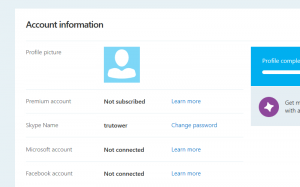
The process of merging the two accounts is quite simple. For this process, we’re going to show users where they can find more information on this process as well as the process itself. First, point your browser to Skype.com. The first thing you want to do (after you sign in or sign up, of course) is click on “Profile” under the “Account Details” header. This will bring you directly to the profile page where you can edit your information.
Skype merge Windows Live Messenger, Microsoft Account on Skype, Merge accounts together

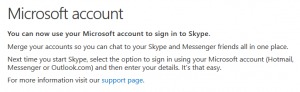
From here, simply click on the “Learn more” link to the direct right of the header that reads “Microsoft account” and “Not connected.” This will come up with a dialogue box that will show you how you can merge your two accounts:
Skype and WLM, Microsoft account with Skype, MSN Messenger on Skype

Next, simply start Skype, and enter your Microsoft account information under the account settings. Depending on your version (of which there are many), the Account settings page will be in a different location. For instance, in Windows 8, the account settings is on the lower right side of the screen after clicking on “Settings” in the charms bar and then on “Profile.”

Once you’ve done so, your accounts should be merged and you’ll be able to chat with your Skype and Windows Live friends all in one location. At this point, you can also choose to uninstall Windows Live Messenger and just simply use Skype from now on. If you’re using Windows RT, merging the accounts is the only option to allow you to stay in contact with your Windows Live Messenger friends since the IMing platform is not and will not be available for Windows RT.

Photo: VentureBeat

Tags: How-To, Microsoft, Microsoft Account, Skype VoIP and IM, Voice Over Internet Protocol (VoIP) (Wi-Fi Calling), Windows Live Messenger (MSN Messenger)
  • http://twitter.com/ZackKennedy Zack Kennedy

    It’s going to be the only option when Windows Live Messenger closes down on the March 15th anyway. Great help, thanks!

Recent Articles

Rebtel for Android Picks Up New Graphics, Bug Fixes in Latest Update

Rebtel for Android Picks Up New Graphics, Bug Fixes in Latest Update

Voxer's Five Reasons to Choose Voxer Pro, Spotlights Professional Management

Voxer's Five Reasons to Choose Voxer Pro, Spotlights Professional Management

Hello Summer! Get Free International Roaming in Asia With WorldSIM

Hello Summer! Get Free International Roaming in Asia With WorldSIM

KakaoTalk for Windows Phone Receives Major Update, Flirts With PC Version

KakaoTalk for Windows Phone Receives Major Update, Flirts With PC Version

Popular Topics

KakaoTalk for Windows Phone Receives Major Update, Flirts With PC VersionKakaoTalk for Windows Phone Receives Major Update, Flirts With PC Version

Tango Update Brings New Look and a Number of Enhancements to Android, Coming Soon for iOSTango Update Brings New Look and a Number of Enhancements to Android, Coming Soon for iOS

Send and Receive Voice, Video Messages on Kik Messenger With “Recorder for Kik”Send and Receive Voice, Video Messages on Kik Messenger With “Recorder for Kik”

Kik Messenger is Not Going to “Cost Money” Despite Claims By Forwarded MessagesKik Messenger is Not Going to “Cost Money” Despite Claims By Forwarded Messages

The Tower

About Us
Contact Us
Privacy Policy
Terms of Use
Advertise With Us

The Hotspots

Android
iOS -- iPhone   iPad
Windows Phone
Symbian
BlackBerry -- Handsets   PlayBook
Firefox OS (Boot to Gecko)
Windows 8
Ubuntu

The Channels

TruTorials
The TruTh
TruTechies

The Networks

  
truphone news truphone media 

The Mobile

Search for "TruTower" on Flipboard or visit this site on a mobile device.

©2013 TruTower.com. All rights reserved.

All names, brands, and logos displayed herein are properties of their respective owners.